Disclosure: As an Amazon Associate I earn from qualifying purchases.
This site is a participant in the Amazon Services LLC Associates Program. As an Amazon Associate, we earn from qualifying purchases.
- Choosing a Laptop for College in 2026
- Quick Comparison Table
- 1. Apple MacBook Air 13″ M5 — Best Overall
Choosing a Laptop for College in 2026
With back-to-school season here, picking the right laptop comes down to balancing budget, battery life, and how much RAM and storage you’ll actually need over a 4-year degree. Laptops are one of the few purchases a student makes that has to survive daily use for years, through late-night papers, video calls, and whatever software your major throws at you — so it’s worth spending more time on this decision than on almost any other back-to-school item.
Below we compare three current options that cover very different budgets and use cases: a premium Apple pick built for longevity, a sub-$400 Windows laptop that punches above its price, and a touchscreen 2-in-1 aimed at note-takers. All specs and prices below are sourced from the manufacturers’ official listings and current Amazon product pages; pricing is current as of August 2026 and can change, so double-check the live price before buying.
How we chose these three: rather than picking three laptops in the same price range, we deliberately picked one from each major budget tier (under $400, around $950-1,100, and around $1,250) so this comparison works whether you’re outfitting a dorm room on a tight budget or buying a laptop you expect to last through grad school.
Quick Comparison Table
| Model | Price (Aug 2026) | Chip | RAM | Storage | Display | Battery (rated) |
|---|---|---|---|---|---|---|
| MacBook Air 13″ M5 | $949 street / $1,099 MSRP | Apple M5 | 16GB unified | 512GB SSD | 13.6″ Liquid Retina | Up to 18 hrs |
| Acer Aspire Go 15 | $398.28 | Intel Core 3 N355 | 16GB DDR5 | 128GB PCIe SSD | 15.6″ FHD | Up to 14.5 hrs |
| Surface Laptop 7 | $1,249.99 | Snapdragon X Plus | 16GB DDR5 | 1TB SSD | 13.8″ 2K+ touch | Up to 20 hrs |
1. Apple MacBook Air 13″ M5 — Best Overall
Apple’s M5 chip (10-core CPU, 8 or 10-core GPU) brings a 28% memory-bandwidth increase over the previous M4 generation (153GB/s vs 120GB/s), along with a Neural Accelerator built into each GPU core, a third-generation ray-tracing engine, Wi-Fi 7, Bluetooth 6, and up to 18 hours of rated battery life. The 16GB/512GB configuration is the current sweet spot for students who want a machine that will still feel fast in four years — the 512GB base storage is double what the previous M4 generation shipped with at the same price tier.
Who it’s for: Students who want one laptop for all four years without worrying about it aging out, especially those doing any video editing, photography, music production, or coding, where Apple’s efficiency cores and long battery life genuinely matter. It’s also the safest pick if you’ll be working alongside Mac-only software in your major (film, design, some CS programs).
- Excellent battery life and a near-silent fanless design
- Wi-Fi 7 and Bluetooth 6 for future-proofing against next-gen campus networks
- 512GB base storage — double the previous M4 generation at a similar price
- Premium build quality and Apple’s longest typical software support window
- Higher upfront price than the Windows alternatives here
- Only 2 Thunderbolt ports — you’ll likely want a hub for anything beyond a charger and one accessory
- No touchscreen, and RAM/storage can’t be upgraded after purchase

Apple MacBook Air 13″ M5 (16GB/512GB, Midnight)

2. Acer Aspire Go 15 — Best Budget Pick
At under $400, the Aspire Go 15 pairs an 8-core Intel Core 3 N355 processor with 16GB of DDR5 RAM — more memory than many laptops twice the price ship with. It’s rated for 14.5 hours of battery life and includes a full 15.6″ FHD anti-glare display, making it a solid choice for note-taking, browser-based coursework, and video calls. It also ships with Microsoft 365 Web access included, which covers most students’ day-to-day Office needs without an extra subscription.
Who it’s for: Students on a tight budget, or anyone who mainly needs a laptop for web browsing, Google Docs/Microsoft Office, streaming lecture recordings, and video calls. It’s also a sensible “beater” laptop to bring to the library instead of a $1,000+ machine.
- 16GB RAM is unusually generous for this price point — most $400 laptops still ship with 8GB
- Large 15.6″ anti-glare display, easier on the eyes for long study sessions
- Long rated battery life (14.5 hrs) for a budget machine
- Includes Microsoft 365 Web
- The entry-level Core 3 N355 CPU struggles with heavy multitasking, large spreadsheets, or photo/video editing
- 128GB storage fills up quickly — plan on cloud storage or a microSD card for photos, videos, and installed apps
- No dedicated GPU, so it’s not a gaming or creative-work machine
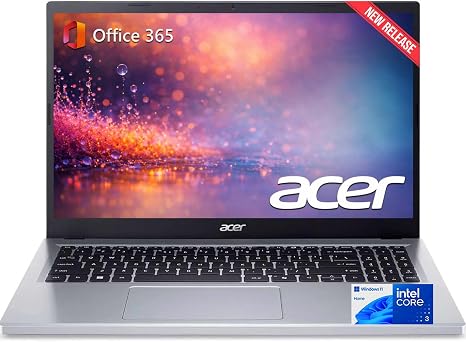
Acer Aspire Go 15 (Core 3 N355, 16GB/128GB)

 ポチップ
ポチップ
3. Microsoft Surface Laptop 7 — Best 2-in-1 / Touchscreen
The Surface Laptop 7 pairs a 10-core Snapdragon X Plus chip with a 13.8″ 2K+ touchscreen and up to 20 hours of rated battery life — the longest of the three. This configuration ships with 16GB of RAM and a generous 1TB SSD, making it the most storage-rich option here, useful for students who work with large files (video, CAD, research datasets) or simply don’t want to think about storage management for four years.
Who it’s for: Students who take handwritten or stylus notes (engineering, math, design majors especially), or who want the flexibility of a touchscreen for annotating PDFs and slides directly. The 1TB SSD also makes it a good fit for STEM majors working with large datasets or CAD files.
- Touchscreen support — genuinely useful for note-taking apps and stylus input
- Longest rated battery life of the three (20 hrs)
- 1TB SSD, by far the most storage of the three options here
- ARM-based efficiency with full Windows 11 Pro, including standard business features like BitLocker
- Most expensive option in this comparison
- Snapdragon (ARM) chip can have compatibility quirks with older, x86-only Windows software — check before buying if you rely on specialized major-specific software

Microsoft Surface Laptop 7 (Snapdragon X Plus, 16GB/1TB)
 ポチップ
ポチップ
Frequently Asked Questions
Is 16GB of RAM enough for college in 2026?
For the vast majority of students — web browsing, Google Docs/Microsoft Office, video calls, streaming, and light photo editing — 16GB is comfortably enough and is now the realistic minimum, since browser tabs alone can use several gigabytes. Only students doing heavy video editing, 3D modeling, or running multiple virtual machines need to consider 24GB or more.
Can the Acer Aspire Go 15 handle Photoshop or video editing?
Not comfortably. The Core 3 N355 is an entry-level, fanless processor designed for browsing and office work, not sustained creative workloads. For photo or video editing, the MacBook Air M5 or Surface Laptop 7 in this comparison are both much better suited.
Does the Surface Laptop 7’s Snapdragon chip run all Windows software?
Most mainstream apps (Office, Chrome, Zoom, Adobe’s Creative Cloud apps) now run natively or through Windows’ emulation layer without issue. Some older or niche Windows-only engineering, CAD, or lab-specific software built only for x86 processors may not run well or at all — if your major requires a specific piece of specialized software, it’s worth checking compatibility before buying an ARM-based laptop.
Is 512GB enough storage on the MacBook Air M5?
For most students relying on cloud storage (iCloud, Google Drive, OneDrive) for large files, 512GB is comfortable for four years of documents, photos, and installed apps. Film, photography, or music-production majors working with large local media libraries may want to budget for the 1TB configuration instead.
Final Verdict
Best overall: the MacBook Air 13″ M5 if your budget allows it — the battery life, build quality, and Wi-Fi 7 support give it the longest useful lifespan for a 4-year degree.
Best budget pick: the Acer Aspire Go 15 if you need a capable machine for browser-based coursework under $400.
Best for note-takers: the Surface Laptop 7 if you want a touchscreen and the most storage headroom of the three.
Whichever you choose, prioritize battery life and RAM over raw CPU speed for a typical undergraduate workload — those are the two specs you’ll notice every single day on campus.
What Actually Matters When Buying a Student Laptop
It’s easy to get pulled into comparing clock speeds and benchmark numbers, but for most undergraduates, four specs decide whether a laptop feels good to use every day: battery life, RAM, keyboard quality, and weight. A laptop that dies before your afternoon lab, or that starts stuttering with fifteen browser tabs open during finals week, will frustrate you far more than a slightly slower processor ever will.
Battery life matters more than raw speed for most majors, because outlets in lecture halls and libraries are never guaranteed. All three laptops above are rated for 14.5 hours or more, which should realistically get most students through a full day of classes on a single charge, though rated figures from manufacturers are usually measured under light, idealized use and tend to run 15-25% lower in real-world mixed use.
RAM is the spec most likely to make an older laptop feel slow, since modern browsers and collaborative tools (Zoom, Google Docs, Canvas/Blackboard in a browser tab) are memory-hungry even before you open a single application. 16GB, as all three laptops here offer, is a safe baseline for the next several years.
Weight and portability matter if you’re walking across campus between classes multiple times a day. All three laptops in this comparison are in the 13-15.6″ class and reasonably portable, though the Acer Aspire Go 15’s larger 15.6″ screen does add some bulk compared to the two 13-14″ options.
Repairability and warranty are worth a few minutes of research before you buy, since a laptop that breaks in year two of a four-year degree is a real cost. Check what each manufacturer’s standard warranty covers, whether accidental damage protection is available at checkout, and whether your school offers a discount on manufacturer or third-party extended coverage — some university bookstores and IT departments negotiate discounted AppleCare or Microsoft Complete plans.
A Note on Buying Refurbished or Previous-Generation Models
If your budget is tight, it’s worth checking Apple’s refurbished store or previous-generation configurations (like the M4 MacBook Air, the generation before the M5 featured above) before committing to a brand-new base model. Manufacturers frequently keep the prior generation in the lineup at a discount specifically to give budget-conscious and education buyers a lower entry point, and the practical, day-to-day difference between consecutive chip generations is usually smaller than the price gap suggests for typical coursework.
Buying through our links helps support this site at no extra cost. Thank you for your support!